Starting point
Approvals & compliance
Manage approvals without email ping-pong
Requests automatically follow the right roles, deadlines and delegates with a complete decision history.
Process architecture
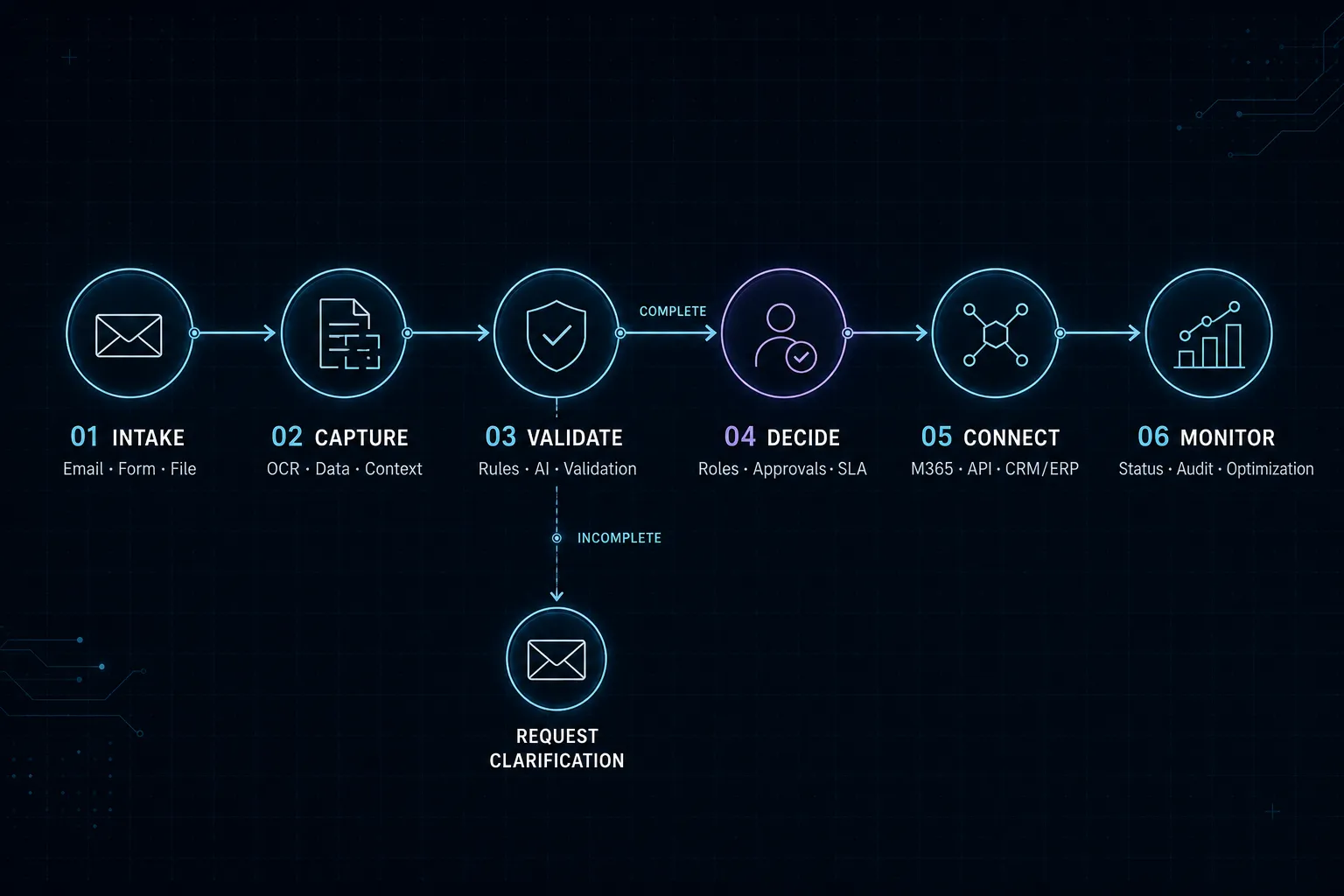
From intake to a dependable outcome.
Every phase contains clear, traceable steps. Checks, branches and handoffs remain visible instead of disappearing into a black box.
01Input
Intake & context
Sources, data and business context are brought together in a controlled way.
3 Steps
02Process
Logic & control
Rules, AI and human review form the traceable process core.
3 Steps
03Output
Result & handoff
Results are handed to people and systems of record in a structured form.
3 Steps
Source01Capture the request
A form or business system provides purpose, amount, cost center, documents and required date.Details
Capture the request
A form or business system provides purpose, amount, cost center, documents and required date.
Interfaces
- Microsoft Graph API
- SharePoint API
Next steps
- Determine the role
Data02Determine the role
Organization, location, amount and request type determine the responsible people.Details
Determine the role
Organization, location, amount and request type determine the responsible people.
Interfaces
- Azure AI Document Intelligence
- Mistral OCR
- Dataverse API
Next steps
- Validate evidence
Data03Validate evidence
Required information and supporting documents are checked before approval begins.Details
Validate evidence
Required information and supporting documents are checked before approval begins.
Interfaces
- Azure AI Document Intelligence
- Mistral OCR
- Dataverse API
Next steps
- Build the approval path
System04Build the approval path
The appropriate sequence of business, budget and compliance approvals is created dynamically.Details
Build the approval path
The appropriate sequence of business, budget and compliance approvals is created dynamically.
Interfaces
- Dynamics 365 API
- Azure Service Bus
Next steps
- Record the decisionDirect decision
- Monitor deadlinesDeadline or delegate
System05Monitor deadlines
Reminders, escalations and delegates keep requests from being left behind.Details
Monitor deadlines
Reminders, escalations and delegates keep requests from being left behind.
Interfaces
- Dynamics 365 API
- Azure Service Bus
Next steps
- Record the decision
Approval06Record the decision
Approval, rejection, comments and changes are documented with time and identity.Details
Record the decision
Approval, rejection, comments and changes are documented with time and identity.
Interfaces
- Teams Adaptive Cards
- Power Apps
Next steps
- Return the result
- Start downstream work
- Archive evidence
Result07Return the result
The requester and business system receive the decision, reason and next step.Details
Return the result
The requester and business system receive the decision, reason and next step.
Interfaces
- Power BI API
- Teams Webhook
Result08Start downstream work
Purchase, contract, user account or leave process continues only after valid approval.Details
Start downstream work
Purchase, contract, user account or leave process continues only after valid approval.
Interfaces
- Power BI API
- Teams Webhook
Result09Archive evidence
The complete history remains available for internal controls and audits.Details
Archive evidence
The complete history remains available for internal controls and audits.
Interfaces
- Power BI API
- Teams Webhook
System landscape
Interfaces and apps working together.
- Microsoft
Microsoft Graph API
Möglicher Baustein für die Microsoft-Systemvariante.
- Microsoft
SharePoint API
Möglicher Baustein für die Microsoft-Systemvariante.
- Microsoft
Azure AI Document Intelligence
Möglicher Baustein für die Microsoft-Systemvariante.
- Microsoft
Mistral OCR
Möglicher Baustein für die Microsoft-Systemvariante.
- Microsoft
Dataverse API
Möglicher Baustein für die Microsoft-Systemvariante.
- Microsoft
Power Automate
Möglicher Baustein für die Microsoft-Systemvariante.
- Microsoft
Azure Functions
Möglicher Baustein für die Microsoft-Systemvariante.
- Microsoft
Azure OpenAI GPT
Möglicher Baustein für die Microsoft-Systemvariante.
- Microsoft
Anthropic Claude
Möglicher Baustein für die Microsoft-Systemvariante.
- Microsoft
AI Builder
Möglicher Baustein für die Microsoft-Systemvariante.
- Microsoft
Teams Adaptive Cards
Möglicher Baustein für die Microsoft-Systemvariante.
- Microsoft
Power Apps
Möglicher Baustein für die Microsoft-Systemvariante.
- Microsoft
Dynamics 365 API
Möglicher Baustein für die Microsoft-Systemvariante.
- Microsoft
Azure Service Bus
Möglicher Baustein für die Microsoft-Systemvariante.
- Microsoft
Power BI API
Möglicher Baustein für die Microsoft-Systemvariante.
- Microsoft
Teams Webhook
Möglicher Baustein für die Microsoft-Systemvariante.
- Potential interfaces
Microsoft Graph
Users, roles, groups and delegates from the Microsoft environment.
- Potential interfaces
ERP or HR API
Starts and completes purchasing or people workflows.
- Potential interfaces
Webhook / Adaptive Cards
Secure decisions directly in Teams or a business application.
- Potential apps & platforms
Microsoft Teams
Approvals and questions in a familiar interface.
- Potential apps & platforms
SharePoint or Dataverse
Structured request data and a traceable history.
Delivery in context
Not merely automated, but dependable in daily work.
A clearly bounded approval process is an effective first automation project. The initial production release can often build on existing Microsoft 365 structures.
Exceptions such as delegates, later changes and multi-step rejection are agreed before delivery. This keeps the workflow dependable outside the happy path.
Target outcome
Faster decisions, clear ownership and an auditable history without disconnected tools.
Expected value
- No more searching for current status
- Automatic reminders and delegates
- Consistent rules across teams
- Complete decision and change history
What is needed to start
- 01One clearly defined request type
- 02Known approval roles and amount thresholds
- 03Decision on the system of record and archive
Your next step
Which process costs your team unnecessary time every day?
Give us a short outline. We will tell you honestly where automation is useful—and where it is not.