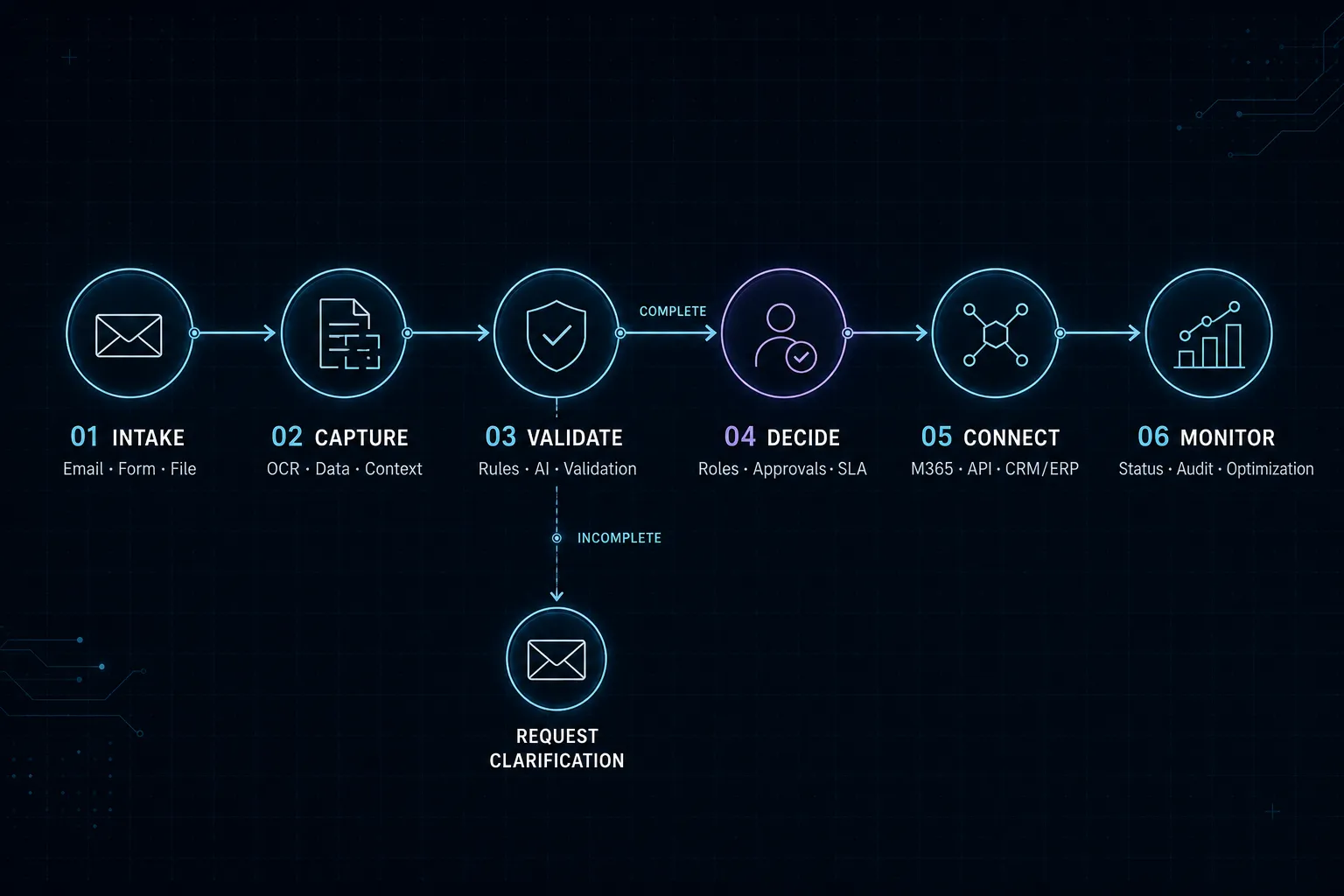
Starting point
Email & intake channels
Understand and route incoming messages automatically
AI identifies requests, attachments and priorities, then moves every message into the right downstream workflow with clear controls.
Process architecture
From intake to a dependable outcome.
Every phase contains clear, traceable steps. Checks, branches and handoffs remain visible instead of disappearing into a black box.
01Input
Intake & context
Sources, data and business context are brought together in a controlled way.
3 Steps
02Process
Logic & control
Rules, AI and human review form the traceable process core.
3 Steps
03Output
Result & handoff
Results are handed to people and systems of record in a structured form.
3 Steps
Source01Capture the message
Emails are retrieved from approved inboxes or APIs with sender, subject and timestamp.Details
Capture the message
Emails are retrieved from approved inboxes or APIs with sender, subject and timestamp.
Interfaces
- Microsoft Graph API
- SharePoint API
Next steps
- Read attachments
Data02Read attachments
PDF, image and Office files are securely captured, checked by file type and prepared for analysis.Details
Read attachments
PDF, image and Office files are securely captured, checked by file type and prepared for analysis.
Interfaces
- Azure AI Document Intelligence
- Mistral OCR
- Dataverse API
Next steps
- Add business context
Data03Add business context
Customer, contract or order data from CRM and business systems enriches the request.Details
Add business context
Customer, contract or order data from CRM and business systems enriches the request.
Interfaces
- Azure AI Document Intelligence
- Mistral OCR
- Dataverse API
Next steps
- Classify the request
Action04Classify the request
An AI model identifies the topic, intent and relevant information within defined confidence thresholds.Details
Classify the request
An AI model identifies the topic, intent and relevant information within defined confidence thresholds.
Interfaces
- Power Automate
- Azure Functions
- Microsoft Graph API
Next steps
- Determine priority
Decision05Determine priority
Business rules evaluate customer type, deadlines, keywords and existing service levels.Details
Determine priority
Business rules evaluate customer type, deadlines, keywords and existing service levels.
Interfaces
- Azure OpenAI GPT
- Anthropic Claude
- AI Builder
Next steps
- Create the caseDirect path
- Assign ownership
- Communicate status
- Control exceptionsReview required
Approval06Control exceptions
Ambiguous or sensitive cases enter a managed human review with the analysis attached.Details
Control exceptions
Ambiguous or sensitive cases enter a managed human review with the analysis attached.
Interfaces
- Teams Adaptive Cards
- Power Apps
Next steps
- Create the case
- Assign ownership
- Communicate status
Result07Create the case
A ticket, lead, task or order is generated with all recognized information in structured form.Details
Create the case
A ticket, lead, task or order is generated with all recognized information in structured form.
Interfaces
- Power BI API
- Teams Webhook
Result08Assign ownership
The team, owner and escalation path are set automatically and transparently.Details
Assign ownership
The team, owner and escalation path are set automatically and transparently.
Interfaces
- Power BI API
- Teams Webhook
Result09Communicate status
Receipt, expected response and status are returned through the appropriate channel.Details
Communicate status
Receipt, expected response and status are returned through the appropriate channel.
Interfaces
- Power BI API
- Teams Webhook
System landscape
Interfaces and apps working together.
- Microsoft
Microsoft Graph API
Möglicher Baustein für die Microsoft-Systemvariante.
- Microsoft
SharePoint API
Möglicher Baustein für die Microsoft-Systemvariante.
- Microsoft
Azure AI Document Intelligence
Möglicher Baustein für die Microsoft-Systemvariante.
- Microsoft
Mistral OCR
Möglicher Baustein für die Microsoft-Systemvariante.
- Microsoft
Dataverse API
Möglicher Baustein für die Microsoft-Systemvariante.
- Microsoft
Power Automate
Möglicher Baustein für die Microsoft-Systemvariante.
- Microsoft
Azure Functions
Möglicher Baustein für die Microsoft-Systemvariante.
- Microsoft
Azure OpenAI GPT
Möglicher Baustein für die Microsoft-Systemvariante.
- Microsoft
Anthropic Claude
Möglicher Baustein für die Microsoft-Systemvariante.
- Microsoft
AI Builder
Möglicher Baustein für die Microsoft-Systemvariante.
- Microsoft
Teams Adaptive Cards
Möglicher Baustein für die Microsoft-Systemvariante.
- Microsoft
Power Apps
Möglicher Baustein für die Microsoft-Systemvariante.
- Microsoft
Dynamics 365 API
Möglicher Baustein für die Microsoft-Systemvariante.
- Microsoft
Azure Service Bus
Möglicher Baustein für die Microsoft-Systemvariante.
- Microsoft
Power BI API
Möglicher Baustein für die Microsoft-Systemvariante.
- Microsoft
Teams Webhook
Möglicher Baustein für die Microsoft-Systemvariante.
- Potential interfaces
Microsoft Graph / Gmail API
Secure access to approved inboxes, messages and attachments.
- Potential interfaces
CRM or ticket API
Match existing contacts and hand over structured cases.
- Potential interfaces
Webhook / REST
Connect custom business systems and downstream automations.
- Potential apps & platforms
Outlook & Microsoft Teams
Working surface for inboxes, questions and exceptions.
- Potential apps & platforms
Power Automate or n8n
Orchestrates rules, handoffs and notifications.
- Potential apps & platforms
Zendesk, Jira or Dynamics 365
Central case handling and complete traceability.
Delivery in context
Not merely automated, but dependable in daily work.
The solution does not replace an existing service or CRM platform. It adds an intelligent intake layer that turns unstructured communication into dependable process data.
Rules and AI decisions remain transparent. Confidence thresholds, human approvals and audit logs keep critical cases from being processed without control.
Target outcome
Faster response times, consistent ownership and a traceable status from the first customer contact.
Expected value
- Less manual review and forwarding
- Urgent cases are recognized earlier
- Consistent data quality in downstream systems
- Measurable response and processing times
What is needed to start
- 01Defined inboxes and ownership
- 02Representative request examples for rules and testing
- 03Technical access to at least one downstream system
Your next step
Which process costs your team unnecessary time every day?
Give us a short outline. We will tell you honestly where automation is useful—and where it is not.